This article describes the design and implementation of a 4-degree-of-freedom robotic arm controlled via the PCA9685 16-channel PWM controller. The system integrates servo motors with embedded Prolog logic for motion planning and coordination. We detail the hardware architecture, communication protocols, and software framework required to achieve precise robotic manipulation. The approach demonstrates effective use of pulse-width modulation for servo control in resource-constrained embedded systems, making it applicable to educational robotics and industrial automation applications.
Also available as a PDF.
Introduction
Suppose that you have a “four degrees of freedom” robotic arm controlled by four servo motors:
- one for the shoulder joint,
- one for the elbow joint,
- one for the wrist joint and
- one for a gripper at the end of the arm.
Each servo motor requires a pulse-width modulated (PWM) signal to control its position; see Figure 1. The NXP Semiconductor PCA9685 is a great tool for generating the PWM signals for a robotic arm, as it can control up to 16 channels with 12-bit resolution, allowing for precise control of each servo motor.
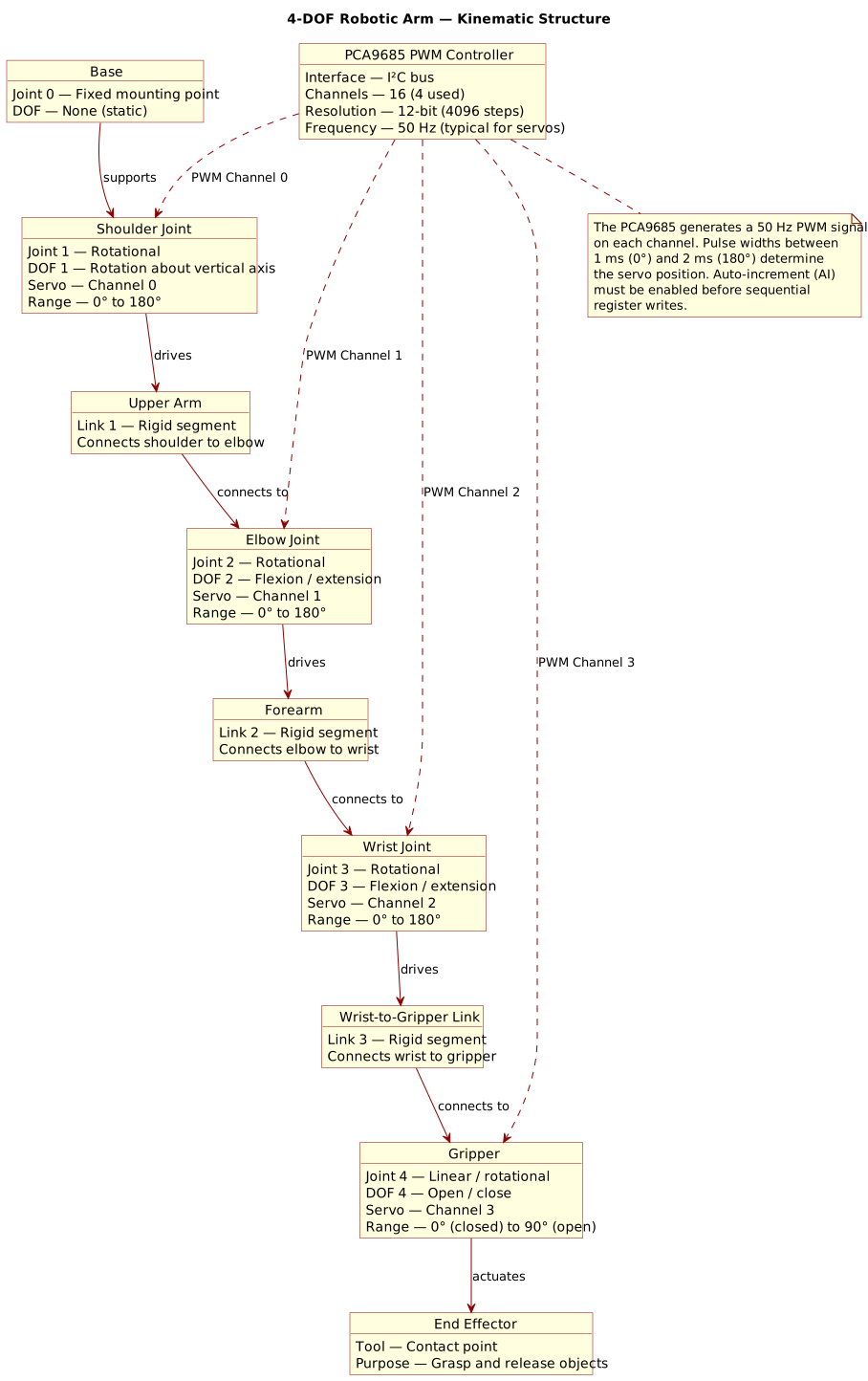
Figure 1: Kinematic structure of a 4-DOF robotic arm.
This article will explore how to use the PCA9685 to control a 4-DOF robotic arm using Linux sysfs, including
- how to connect the PCA9685 to the servo motors,
- how to generate the appropriate PWM signals, and
- how to implement a control system to move the robotic arm to desired positions.
Servo motor control by PWM
How does a PWM signal control a servo motor? A PWM signal consists of a series of pulses, where the width (duration) of each pulse determines the position of the servo motor. For example, a pulse width of 1 millisecond might correspond to the servo being at its minimum position, while a pulse width of 2 milliseconds might correspond to the servo being at its maximum position. By varying the pulse width between these two extremes, you can control the position of the servo motor with fairly high precision.
Inside the servo motor, there is a small circuit that interprets the PWM signal. The circuit uses the pulse width to determine how much to rotate the motor shaft. When the pulse width is short, the motor rotates to a position corresponding to that width. When the pulse width is long, it rotates to a different position. By continuously sending PWM signals with varying widths, a control system can move the servo motor to any desired position within its range. Of course, exactly which pulse width corresponds to which position depends on the servo’s physical characteristics and the mechanical setup within the robotic arm: its mounting and link geometry, friction, and load conditions.
NXP Semiconductor’s PCA9685
What is the PCA9685? To quote NXP Semiconductor,
“The PCA9685 is a 16-channel LED controller that operates via I2C-bus, specifically designed for Red/Green/Blue/Amber (RGBA) colour back-lighting applications. Each LED output features its own 12-bit resolution, equating to 4096 brightness levels, managed by a dedicated PWM (Pulse Width Modulation) controller. This controller can be programmed to operate at frequencies ranging from a typical 24 Hz to 1526 Hz, with the duty cycle adjustable between 0% and 100%, allowing for precise control over brightness levels. Notably, all outputs maintain the same PWM frequency, ensuring consistency in lighting performance.”
In short, it’s a chip that drives up to 16 LEDs with 12-bit resolution and a 25MHz internal oscillator. Good for LED control, but also for driving servo motors, which are essentially pulse-controlled devices whose angular rotation is proportional to the duty cycle of the PWM signal. See Figure 2 for a schematic of the PCA9685.
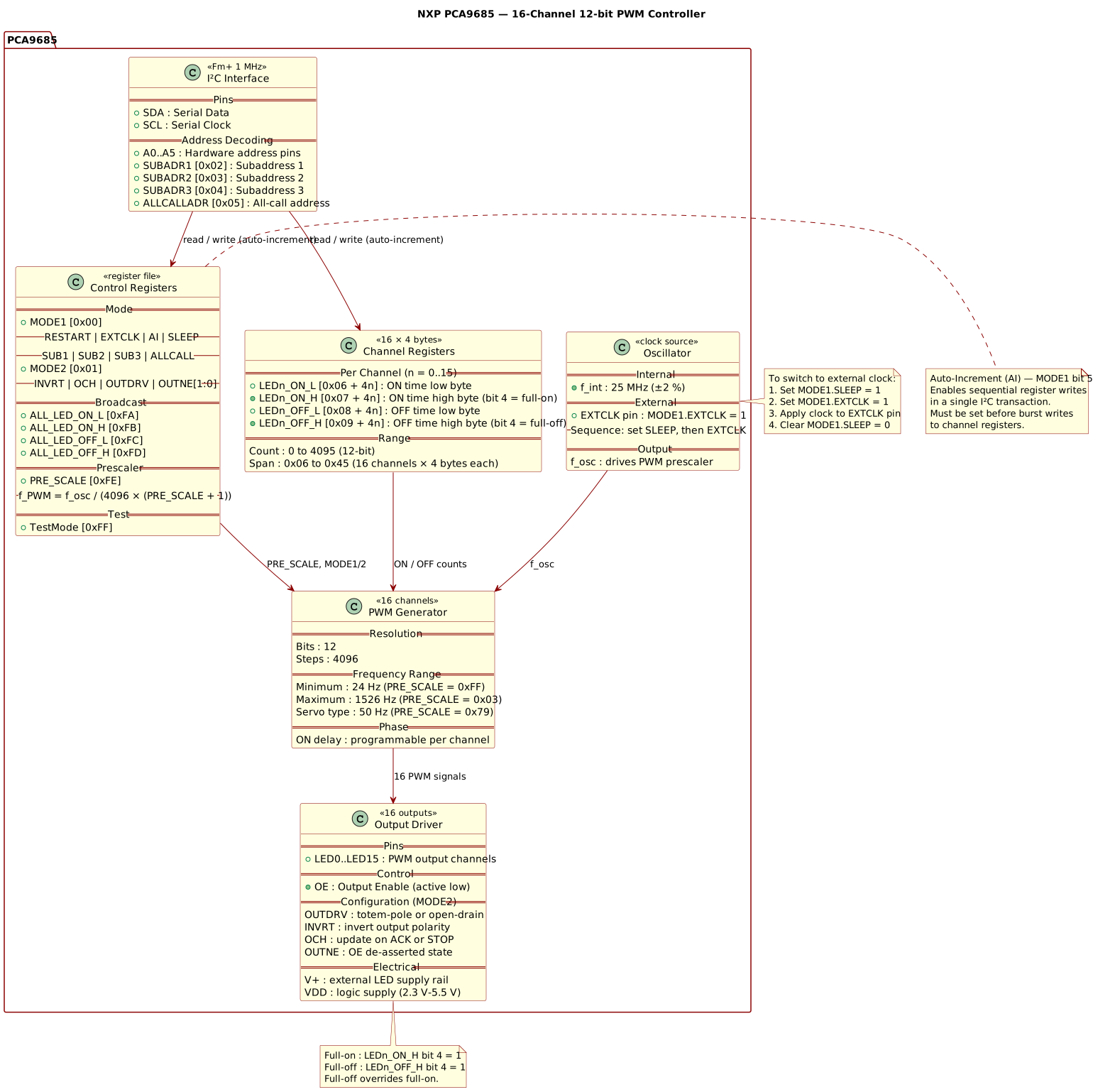
Figure 2: NXP PCA9685—a 16-Channel 12-bit PWM Controller.
Linux Kernel configuration
The Linux kernel needs to be configured to support the PCA9685(A) I2C PWM controller. The “A” suffix indicates the A-step variant of the chip. Configuration is done by adding the following line to the device tree overlay configuration:
dtparam=i2c_arm=on

# Add support for an NXP PCA9685A I2C PWM controller.
dtoverlay=i2c-pwm-pca9685a
What does this do? It adds support for the PCA9685A I2C PWM controller
to the Linux kernel, allowing the system to communicate with and control
the PCA9685A chip via the I2C interface. This enables users to utilise
the features of the PCA9685A, such as controlling LED brightness or
driving servo motors, through software running on the device. The
dtoverlay directive specifies a device tree overlay, a way to modify
the kernel’s device tree at runtime.
How does it find the PCA9685A? The kernel will scan the I2C bus for the device and identify the PCA9685A based on its unique I2C address. Once detected, the kernel will load the corresponding driver, enabling communication and control of the PCA9685A chip through the I2C interface. This allows users to interact with the chip via software commands, such as setting PWM values to control LED brightness or controlling servo motors connected to the PCA9685A.
It’s worth noting that the dtoverlay command can be used with various
parameters to specify the I2C address of the PCA9685A and other
settings. For example, you can specify the I2C address using the
addr parameter, and you can also select the I2C bus using standard
I2C bus selection parameters. This flexibility allows for
customisation based on your specific hardware setup and requirements.
$ dtoverlay -h i2c-pwm-pca9685a
Name:   i2c-pwm-pca9685a

Info:   Adds support for an NXP PCA9685A I2C PWM controller on i2c_arm

Usage:  dtoverlay=i2c-pwm-pca9685a,<param>=<val>

Params: addr                    I2C address of PCA9685A (default 0x40)
        i2c-bus                 Supports all the standard I2C bus selection
                                parameters - see "dtoverlay -h i2c-bus"
Reading and Writing sysfs Files
Communication between an application and the PWM device driver can be
done by reading and writing to files within the sysfs filesystem on
Linux. This is a simple and common way to interact with drivers and
hardware devices from user space. However, it is not the most efficient
method for frequent or high-speed interactions, as it involves opening
and closing files for each read or write operation. For more efficient
communication, using ioctl system calls through character device files
is preferable, as it allows for more direct and efficient interaction
with the device driver without additional overhead.
Interacting reads or writes entire files. For example, to read the
current PWM pulse width for a channel, one would read the contents of
the corresponding duty_cycle file in the sysfs directory for that
channel. To set a new PWM pulse width, one would write the desired value
to the same duty_cycle file. The PWM channel’s duty cycle passes
through the virtual file as an integer in ASCII characters representing
a number of nanoseconds; the driver scales this value accordingly.
This is another catch-22 of the sysfs interface: it is simple and easy
to use, but it requires implicit knowledge of the layout and the
formatting of the files, as well as allowance for the fact that the file
contents are not static and may change based on the state of the device.
For example, when a new channel is exported, the corresponding sysfs
files do not appear instantaneously; there is a delay between the time
when the userland application requests an export and the appearance of
the corresponding sysfs files. This means that applications must be
designed to handle such delays and potential changes in the sysfs file
structure, which can add complexity to the implementation.
As an exercise in Prolog, the following predicates read_file_as/2 and
write_file_as/2 provide a flexible way to read and write files in
various formats, abstracting away the details of file handling and
allowing for different data representations. These predicates use a
multifile read_file:as/3 and write_file:as/3 predicates to define
various read and write methods, making it easy to extend with additional
formats as needed. This approach allows for a more modular and reusable
way to handle file I/O in Prolog, especially when dealing with the
sysfs interface for device driver communication.
Reading as something
The following Prolog code defines a predicate read_file_as/2 that
reads the contents of a file and converts it to a specified format based
on the provided term. The term can specify different formats such as
term(Term),bytes(Bytes),number(Number),atom(Atom),lines(Lines),line(Line),bigs(Width, Bigs),big(Width, Big),littles(Width, Littles),little(Width, Little).
The actual reading and conversion logic is implemented in the as/3
predicate, which is defined as a multifile predicate, allowing for
extensibility with additional read methods in other modules. Each read
method handles the reading and conversion of the file contents according
to the specified format, providing a flexible way to read files in
various formats as needed by the application.
read_file_as(File, Term) :-
    Term =.. [As, Data],
    !,
    as(As, File, Data).
read_file_as(File, Term) :-
    Term =.. [Name, Arg, Data],
    As =.. [Name, Arg],
    as(As, File, Data).

read_file_as(As, File, Data) :- as(As, File, Data).

% The as/3 predicate is defined as a multifile predicate, which allows it to be
% extended with additional read methods in other modules. Each read-as method is
% defined as a clause of the as/3 predicate, and the first argument specifies
% the name of the read method. The as/3 predicate is called by read_file_as/2 to
% perform the actual reading of the file based on the specified read method. The
% as/3 predicate is semidet, meaning that it will succeed if the file is read
% successfully according to the specified method, and fail otherwise. The as/3
% predicate is also deterministic, meaning that it will not leave a choice point
% after succeeding, as each read method is designed to read the file in a
% specific way and will not produce multiple results for the same file and
% method.
:- multifile as/3.

as(term, File, Data) :-
    as(line, File, Line),
    term_string(Data, Line).
as(bytes, File, Data) :-
    absolute_file_name(File, Abs, [file_errors(fail), access(read)]),
    read_file_to_codes(Abs, Data, [file_errors(fail), type(binary)]).
as(number, File, Data) :-
    as(line, File, Line),
    number_string(Data, Line).
as(atom, File, Data) :-
    as(line, File, Line),
    atom_string(Data, Line).
as(lines, File, Data) :-
    absolute_file_name(File, Abs, [file_errors(fail), access(read)]),
    read_file_to_string(Abs, String, [file_errors(fail)]),
    string_lines(String, Data).
as(line, File, Data) :-
    as(lines, File, [Data]).
as(bigs(Width), File, Data) :-
    as(bytes, File, Bytes),
    once(phrase(sequence(big_endian(Width), Data), Bytes)).
as(big(Width), File, Data) :-
    as(bigs(Width), File, [Data]).
as(littles(Width), File, Data) :-
    as(bytes, File, Bytes),
    once(phrase(sequence(little_endian(Width), Data), Bytes)).
as(little(Width), File, Data) :-
    as(littles(Width), File, [Data]).
The predicate requires that the file exists and is accessible for
reading. If the file does not exist or cannot be read, the predicate
will fail. The read_file:as/3 predicate handles the actual reading and
conversion of the file contents based on the specified format, allowing
for flexible and reusable file reading in Prolog applications.
Accessing a PWM chip
Accessing a PWM chip through the sysfs interface involves reading from
and writing to specific files that represent the state and control of
the PWM channels.
The sysfs_pwmchip_path/2 predicate below retrieves the path to the PWM
chip’s directory in the sysfs filesystem based on the chip number. The
sysfs_pwmchip_read/2 predicate reads the contents of a specified file
for a given PWM chip and converts it to the desired format using the
read_file_as/2 predicate. The file_as/2 private predicate defines
the expected format for specific files, such as npwm being read as a
number and device/name being read as an atom. These predicates provide
a structured way to interact with the sysfs interface for PWM chips,
allowing for efficient reading of the chip’s state and control
parameters in a Prolog application.
sysfs_pwmchip_path(Chip, Path) :-
    sysfs_entry(pwm, Entry, [Chip, npwm]),
    (   var(Path)
    ->  file_directory_name(Entry, Path)
    ;   file_directory_name(Entry, Path),
        !
    ).

sysfs_pwmchip_read(What, Term) :-
    What =.. [Chip, File],
    sysfs_pwmchip_path(Chip, Path),
    read_file_as(Path/File, Term).

sysfs_pwmchip_read(File, Chip, Data) :-
    file_as(File, As),
    sysfs_pwmchip_path(Chip, Path),
    read_file_as(As, Path/File, Data).

file_as(npwm, number).
file_as(device/name, atom).
The sysfs_entry/3 predicate scans the sysfs filesystem for entries
that match the specified criteria: the pwm sub-directory of
/sys/class where a sub-sub-directory represents a PWM chip with a
npwm file for the number of PWM channels.
Writing as something
The following does the opposite of read_file_as/2. It defines a
predicate write_file_as/2 that writes data to a file in a specified
format based on the provided term. Similar to read_file_as/2, the term
can specify different formats such as term(Term), bytes(Bytes),
number(Number), atom(Atom), lines(Lines), line(Line),
bigs(Width, Bigs), big(Width, Big), littles(Width, Littles), or
little(Width, Little). The actual writing and conversion logic is
implemented in the write_file:as/3 predicate, which is defined as a multifile
predicate, allowing for extensibility with additional write methods in
other modules. Each write method handles the conversion of the data to
the specified format and writes it to the file accordingly, providing a
flexible way to write files in various formats as needed by the
application.
write_file_as(File, Term) :-
    Term =.. [As, Data],
    !,
    as(As, File, Data).
write_file_as(File, Term) :-
    Term =.. [Name, Arg, Data],
    As =.. [Name, Arg],
    as(As, File, Data).

write_file_as(As, File, Data) :- as(As, File, Data).

:- multifile as/3.

as(term, File, Data) :-
    term_string(Data, Line),
    as(line, File, Line).
as(bytes, File, Data) :-
    absolute_file_name(File, Abs, [file_errors(fail), access(write)]),
    write_bytes_to_file(Abs, Data, [file_errors(fail), type(binary)]).
as(number, File, Data) :-
    number_string(Data, Line),
    as(line, File, Line).
as(atom, File, Data) :-
    atom_string(Data, Line),
    as(line, File, Line).
as(lines, File, Data) :-
    string_lines(String, Data),
    absolute_file_name(File, Abs, [file_errors(fail), access(write)]),
    write_string_to_file(Abs, String, [file_errors(fail)]).
as(line, File, Data) :-
    as(lines, File, [Data]).
as(bigs(Width), File, Data) :-
    once(phrase(sequence(big_endian(Width), Data), Bytes)),
    as(bytes, File, Bytes).
as(big(Width), File, Data) :-
    as(bigs(Width), File, [Data]).
as(littles(Width), File, Data) :-
    once(phrase(sequence(little_endian(Width), Data), Bytes)),
    as(bytes, File, Bytes).
as(little(Width), File, Data) :-
    as(littles(Width), File, [Data]).
Together, these predicates provide a simple and flexible way to handle
file I/O in Prolog, especially when dealing with the sysfs interface
for device driver communication. By abstracting away the details of file
handling and allowing for different data representations, they enable
developers to easily read and write files in various formats as needed
by their applications.
Exporting
PWM channels are not available by default. To make them available, they
must be “exported” by writing the channel number to the export file in
the sysfs interface. For example, to export channel 0, you would write
“0” to the export file. Once a channel is exported, it becomes
available as a directory in the sysfs interface, and you can read from
or write to the corresponding files to control the PWM signal for that
channel. For example, you can read the current duty cycle of the channel
by reading from the duty_cycle file within the channel’s directory. To
set a new duty cycle, you would write the desired value to the same
duty_cycle file. The value is typically specified in nanoseconds, and
the driver will scale it accordingly based on the configured PWM
frequency.
Export a PWM channel
Given a PCA9685 chip with a certain number of channels, you can export a specific channel using the following Prolog code:
sysfs_pwm_export(Chip, Export, Chan) :-
    sysfs_pwm_chan(Chip, Export, Chan),
    write_file_as(sysfs_class_pwm(Chip/export), number(Export)).

sysfs_pwm_chan(Chip, Export, Chan) :-
    sysfs_pwmchip_read(npwm, Chip, N),
    succ(N0, N),
    between(0, N0, Export),
    format(atom(Chan), 'pwm~d', [Export]).
The sysfs_pwm_export/3 predicate takes three arguments:
Chip, which identifies the PCA9685 chip;Export, which is the channel number to be exported; andChan, which is the name of the channel that will be created in thesysfsinterface.
The predicate first checks if the channel can be exported using
sysfs_pwm_chan/3, which verifies that the specified channel number is
within the valid range of channels available on the chip. If the channel
can be exported, it writes the channel number to the export file in
the sysfs interface, making it available for use.
Caveat: the export operation is not instantaneous. There is a delay
between the time when the userland application requests an export
and the appearance of the corresponding sysfs files. This is
because the kernel needs to create the necessary directory and files in
the sysfs interface for the exported channel, which can take some
time. Therefore, after exporting a channel, it may be necessary to wait
for a short period before the channel’s files become available for
reading or writing. This delay can vary based on the system’s
performance and the current load on the kernel, so it’s important to
account for this when designing applications that interact with the
sysfs interface for PWM control.
Ensuring exported channels are available
To ensure that the exported channels are available before attempting to
read from or write to them, the application must implement a waiting
mechanism that checks for the existence of the required sysfs files.
This can be done using a loop that repeatedly checks for the presence of
the channel’s directory and files in the sysfs interface, with a
timeout to prevent infinite waiting. For example, the application can
use a time limit to wait for the channel to become available, and if it
does not become available within that time frame, it can handle the
situation accordingly (e.g., by logging an error or retrying the export
operation). This approach ensures that the application does not attempt
to interact with channels that have not yet been fully exported and are
not ready for use.
sysfs_pwm_read(File, Chip, Export, Data) :-
    file_as(File, As),
    sysfs_pwm_ensure_exported(Chip, Export, Chan),
    sysfs_exported_with_time_limit(sysfs_class_pwm(Chip/Chan/File), Abs, [access(read)]),
    read_file_as(As, Abs, Data).

:- setting(sysfs_exported_time_limit, number, 1,
           'Time limit for sysfs exported calls in seconds').
:- setting(sysfs_exported_delay_time, number, 0.01,
           'Delay time between sysfs exported call retries in seconds').

sysfs_exported_with_time_limit(File, Abs, Options) :-
    setting(sysfs_exported_time_limit, TimeLimit),
    setting(sysfs_exported_delay_time, DelayTime),
    call_with_time_limit(TimeLimit,
                         (   repeat,
                             absolute_file_name(File, Abs, [file_errors(fail)|Options])
                         ->  !
                         ;   sleep(DelayTime),
                             fail
                         )).
Note that the sysfs_pwm_read/4 predicate ensures that the specified
channel is exported and available before attempting to read from the
corresponding sysfs file. It uses the
sysfs_exported_with_time_limit/3 predicate to wait for the channel’s
files to become available, with a specified time limit and delay between
retries. This approach helps to ensure that the application can reliably
interact with the PWM channels without encountering errors due to
unavailable sysfs files.
Checking needs to apply on a per-file basis, as the sysfs files for a
channel may not all become available at the same time. For example,
the duty_cycle file may become available before the period file, so
the implementation checks for the availability of each required file
before attempting to read from or write to it. This ensures that an
application can easily handle the dynamic nature of the sysfs
interface and avoid errors that may arise from trying to access files
that have not yet been created by the kernel after exporting a channel.
This checking mechanism allows an application to safely interact with
PWM channels in a robust and reliable manner, accounting for the
potential delays in the availability of the sysfs files after
exporting a channel.
Degrees of Freedom
Putting it all together, a robotic arm with 4 degrees of freedom (DOF) can be designed using the PCA9685 servo driver. Each DOF corresponds to a joint that can move independently, allowing the arm to perform complex tasks.
% Find the PWM chip that corresponds to the PCA9685 PWM controller.
pca9685_pwm(Chip) :- sysfs_pwmchip_read(device/name, Chip, 'pca9685-pwm'), !.

% Define the degrees of freedom (DOF) for the robotic arm. Each DOF is
% associated with a specific export number on the PCA9685 PWM controller. For
% example, the shoulder DOF is associated with export number 12, the elbow DOF
% is associated with export number 13, the wrist DOF is associated with export
% number 14, and the gripper DOF is associated with export number 15. The
% predicate is non-deterministic and can be used to find the export number for a
% specific DOF by providing its name (shoulder, elbow, wrist, or gripper).
dof(shoulder, 12).
dof(elbow,    13).
dof(wrist,    14).
dof(gripper,  15).

% Enable or disable a specific DOF by writing to the enable file in the sysfs
% PWM interface. For example, to enable the shoulder DOF, you would call
% dof_enable(shoulder, 1), which would write the value 1 to the enable file for
% the shoulder DOF. To disable the shoulder DOF, you would call
% dof_enable(shoulder, 0), which would write the value 0 to the enable file for
% the shoulder DOF. The predicate is non-deterministic and can be used to enable
% or disable a specific DOF by providing its name (shoulder, elbow, wrist, or
% gripper) and the desired state (1 for enabled, 0 for disabled).
dof_enable(DOF, Enable) :-
    pca9685_pwm(Chip),
    dof(DOF, Export),
    sysfs_pwm_write(enable, Chip, Export, Enable).

% Set the duty cycle for a specific DOF by writing to the duty_cycle file in the
% sysfs PWM interface. The duty cycle is a value between 0 and 1 that represents
% the percentage of time that the signal is high. For example, to set the duty
% cycle for the shoulder DOF to 50%, you would call dof_duty_cycle(shoulder,
% 0.5), which would write the appropriate value to the duty_cycle file for the
% shoulder DOF. The predicate is non-deterministic and can be used to set the
% duty cycle for a specific DOF by providing its name (shoulder, elbow, wrist,
% or gripper) and the desired duty cycle (a value between 0 and 1).
dof_duty_cycle(DOF, DutyCycle) :-
    pca9685_pwm(Chip),
    dof(DOF, Export),
    duty_cycle(Chip, Export, DutyCycle).

% Set the duty cycle for a specific DOF by writing to the duty_cycle file in the
% sysfs PWM interface. The duty cycle is a value between 0 and 1 that represents
% the percentage of time that the signal is high. For example, to set the duty
% cycle for the shoulder DOF to 50%, you would call dof_duty_cycle(shoulder,
% 0.5), which would write the appropriate value to the duty_cycle file for the
% shoulder DOF. The predicate is non-deterministic and can be used to set the
% duty cycle for a specific DOF by providing its name (shoulder, elbow, wrist,
% or gripper) and the desired duty cycle (a value between 0 and 1).
duty_cycle(Chip, Export, DutyCycle) :-
    sysfs_pwm_read(period, Chip, Export, Period),
    clamp(round(DutyCycle * Period), 0, Period - 1, DutyCycle1),
    sysfs_pwm_write(duty_cycle, Chip, Export, DutyCycle1).

clamp(Unclamped, Min, Max, Clamped) :-
    Clamped is min(Max, max(Min, Unclamped)).
Example usage
The following Prolog query demonstrates how to set the duty cycle for the elbow DOF to 30% with debugging enabled:
?- dof_duty_cycle(elbow, 0.3).
% Read string from file: /sys/class/pwm/pwmchip2/(device/name)
pca9685-pwm
--
% Read string from file: /sys/class/pwm/pwmchip2/npwm
17
--
% Read string from file: /sys/class/pwm/pwmchip2/npwm
17
--
% Read string from file: /sys/class/pwm/pwmchip2/pwm13/period
5079040
--
% Read string from file: /sys/class/pwm/pwmchip2/npwm
17
--
% Read string from file: /sys/class/pwm/pwmchip2/npwm
17
--
% Wrote string to file: /sys/class/pwm/pwmchip2/pwm13/duty_cycle
1523712
--
true.
The query calls the dof_duty_cycle/2 predicate for the elbow-specific
DOF. Duty cycle for the elbow DOF becomes 30% (0.3) in this example.
Prolog reads the pre-loaded period from the sysfs interface to
determine the correct value to write to the duty_cycle file for the
specified DOF. It computes the duty cycle from the PWM signal period and
the desired duty cycle. The clamp/4 predicate ensures that the
calculated duty cycle value is within the valid range of \([0,
Period-1]\). Finally, the value is written to the duty_cycle file for
the elbow DOF, effectively setting its position according to the
specified duty cycle.
Of course, it does not instantly move to the 30% position. It takes
some small amount of time: firstly, for the virtual file system to
propagate the change to the duty_cycle file through the driver to the
PCA9685; and secondly, for the servo motor to physically move to the new
position based on the updated PWM signal. The actual time taken can vary
depending on the specific hardware and the system’s current state.
Notice that there are two consecutive reads of the npwm file in the
output. This is because the duty_cycle/3 predicate reads the period
value from the sysfs interface, which involves reading the npwm file
to determine the number of PWM channels available. The first read of
npwm is to check the number of PWM channels, and the second read is to
confirm that the number of channels has not changed before writing the
new duty cycle value. This is a common pattern in Prolog backtracking,
made apparent here when interacting with the external system, where
multiple reads ensure the consistency and correctness of the data being
processed. It could be optimised away by tabling, but that would
assume the device does not change the number of channels; it does not,
but the logic does not know that without additional knowledge. That
could be additional future optimisation logic that memoises results
based on known invariants.
Conclusions
Device driver interaction through sysfs is not ideal. Read access
involves opening a file, reading its contents, and then closing it.
Write access similarly involves opening a file, writing the desired
value, and then closing it. This can be inefficient, especially if the
application needs to read or write frequently over a short period.
The uAPI mechanism in Linux provides a more efficient way to interact
with device drivers through character device files, accessed via I/O
control (ioctl) system calls. This allows for more efficient
communication between user-space applications and device drivers by
avoiding the continual overhead of opening and closing files for each
read or write operation. However, using ioctl requires a more complex
implementation in the device driver and may not be as straightforward
for simple applications.
Nevertheless, for simple applications or infrequent interactions, using
sysfs can be sufficient and easier to implement. For more complex
applications or those requiring high performance, using ioctl through
character device files provides better efficiency and performance.
“Infrequent” characterises the typical use case for a robotic arm
controlled by a PCA9685, where the control signals are updated at a
relatively low frequency, and the overhead of sysfs is not too
significant. However, for applications that require more frequent
updates or real-time performance, using ioctl would be more
appropriate to ensure maximally efficient communication with the device
driver and optimal performance of the robotic arm.
Performance is one thing. Usability is another. The sysfs interface is
simple and easy to use via standard file operations. Still, its use
requires knowledge of the virtual file layout, as well as allowance for
the fact that the file contents are not static and may change based on
the state of the device. In addition, the device driver does not
instantaneously update the sysfs files when exporting a new channel or
changing the PWM value. There is a delay between the time when the
userland application requests an export and the appearance of the
corresponding sysfs files.