The Raspberry Pi RP2350 is a dual-core ARM Cortex-M33 microcontroller that offers substantial computational capability for embedded applications. FreeRTOS, in its Symmetric Multi-Processing (SMP) configuration, can harness both cores simultaneously, scheduling tasks dynamically across them or pinning tasks to a specific core using affinity settings. This article documents a practical experiment integrating SMP FreeRTOS with the RP2350 using the Raspberry Pi Foundation’s official FreeRTOS kernel fork and the Pico SDK.
Integration proves straightforward. The Raspberry Pi Foundation maintains a Pico-compatible FreeRTOS fork that includes the necessary port files for the RP2350’s ARM cores. Adding FreeRTOS to an existing Pico SDK project requires cloning the fork as a Git submodule, supplying a FreeRTOSConfig.h configuration header, and linking the firmware target against the FreeRTOS kernel in CMake. The vTaskStartScheduler() call hands control to the scheduler, which distributes ready tasks across both cores according to priority.
In practice, however, the Pico SDK’s blocking I2C driver reveals a fundamental tension between the SDK’s bare-metal design assumptions and the demands of a preemptive RTOS. Because the SDK I2C implementation spin-waits on hardware flags, it monopolises a core for the duration of every transfer, preventing the scheduler from running other tasks on that core. A concrete I2C bus-scanner task illustrates the problem and motivates the use of interrupt-driven or DMA-based drivers in real-time applications.
The results show that FreeRTOS SMP runs reliably on the RP2350 with minimal effort, but fully exploiting dual-core concurrency requires drivers designed for cooperative use with the scheduler rather than busy-waiting on peripherals.
Also available as a PDF. See also the example code on GitHub.
Introduction
The RP2350 is a nice little dual-core Cortex-M33 microcontroller.
It usefully runs FreeRTOS as an SMP (Symmetric Multi-Processing) operating system with real-time capabilities [1]. Tasks can be scheduled on either core. Tasks can be pinned to a specific core (affinity) or scheduled on either core. See Fig. 1 for an architectural overview of the RP2350.
The Pico SDK has limitations. Its design targets bare-metal programming and does not fully support multi-tasking or the complexities of an RTOS—for instance, the I2C driver blocks by spinning the core1.
I wanted to see how well FreeRTOS could run on the RP2350, and how much of the Pico SDK I could use with it as an SMP-capable RTOS with minimal effort. That is, without coding interrupt-driven drivers or modifying the SDK itself. This article documents the findings of that experiment.
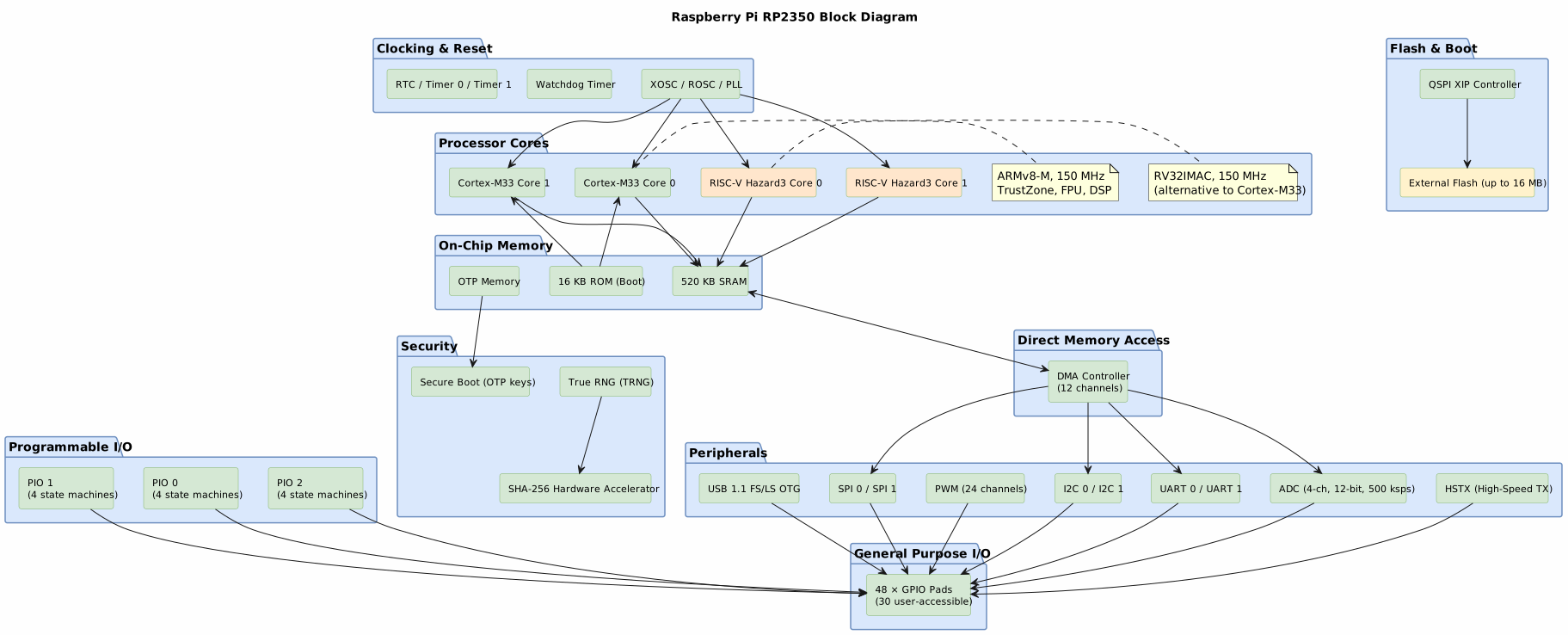
Figure 1: RP2350 architecture; alternative ARM Cortex-M33 or RISC-V cores
FreeRTOS with Pico SDK
One nice thing about developing with the Pico SDK is that it supports FreeRTOS out of the box. The Raspberry Pi Foundation maintains a fork of FreeRTOS that is compatible with the Pico SDK, making it easy to get started with real-time operating system development on the RP2350.
Integrating FreeRTOS with the Pico SDK proves to be a straightforward process. Create a new project using VS Code using its Raspberry Pi Pico extension [2], then clone Raspberry Pi’s FreeRTOS fork into the project directory as a submodule; else fetch it at build time using CMake’s content-fetching module. Add the CMake configuration and C header configuration for FreeRTOS, and the project is ready to start developing with FreeRTOS on the RP2350.
Cloning the Pi-fork of FreeRTOS
Do not clone the “standard” FreeRTOS repository. Instead, clone the Raspberry Pi Foundation’s fork of FreeRTOS, which is compatible with the Pico SDK; it carries the necessary Pico port files [3]. You can do this by running the following command in your project directory:
git submodule add https://github.com/raspberrypi/FreeRTOS-Kernel.gitGit automatically clones the fork’s sub-submodules. This assumes that your project is already a Git repository, of course.
Configuration and linking FreeRTOS
FreeRTOS needs configuration. It needs a FreeRTOSConfig.h header file
that defines various application-specific configuration parameters for
the kernel, such as the tick rate, stack size, and other settings.
Copy two files from the Pico examples to your project’s directory, specifically:
FreeRTOSConfig.handFreeRTOSConfig_examples_common.h.
These files contain the necessary configuration code for FreeRTOS to run on the Pico platform. You might want to remove the “examples” moniker from the common header file name since it’s no longer an example; up to you.
Next, add the following line to your CMakeLists.txt file to include
FreeRTOS in your build:
# Pull in FreeRTOS-Kernel
set(FREERTOS_KERNEL_IMPORT_CMAKE
    ${CMAKE_CURRENT_LIST_DIR}/FreeRTOS-Kernel/portable/ThirdParty/GCC/RP2350_ARM_NTZ/FreeRTOS_Kernel_import.cmake)
if(EXISTS ${FREERTOS_KERNEL_IMPORT_CMAKE})
    include(${FREERTOS_KERNEL_IMPORT_CMAKE})
else()
    message(FATAL_ERROR
        "Missing FreeRTOS kernel import file: ${FREERTOS_KERNEL_IMPORT_CMAKE}\n"
        "The FreeRTOS-Kernel submodule may not be initialised.\n"
        "Run: git submodule update --init --recursive")
endif()
This code checks for the existence of the FreeRTOS kernel import file and includes it in the build process. If the file is missing, it raises a fatal error with instructions on how to initialise the submodule.
Finally, link the firmware’s executable target to the FreeRTOS kernel by adding its target libraries to your firmware target’s link libraries:
# Link the FreeRTOS kernel to the firmware executable
target_link_libraries(FreeRTOS-on-RP2350
    PRIVATE
        FreeRTOS-Kernel-Heap4
        pico_stdlib)
This completes the FreeRTOS-Pico SDK integration. You can now start developing your FreeRTOS application on the RP2350 using the Pico SDK. You can use the FreeRTOS API to create tasks, manage synchronisation, and utilise the RTOS features while still leveraging the hardware capabilities of the RP2350 through the Pico SDK.
Fetching as a build dependency
There is an alternative: using CMake’s FetchContent
module to
pull in the FreeRTOS kernel during the build step. This approach avoids
the need to manage the FreeRTOS kernel as a Git submodule, but it does
require an active internet connection during the build process. To use
FetchContent, add the following code to your CMakeLists.txt file:
# Download FreeRTOS
include(FetchContent)
FetchContent_Declare(freertos_kernel
  GIT_REPOSITORY https://github.com/raspberrypi/FreeRTOS-Kernel.git
  GIT_TAG main # or specify a specific tag or commit
  SOURCE_SUBDIR portable/ThirdParty/GCC/RP2350_ARM_NTZ
)
FetchContent_MakeAvailable(freertos_kernel)
Note that the SOURCE_SUBDIR parameter specifies the FreeRTOS kernel
subdirectory containing the files required for the RP2350 port. After
fetching the FreeRTOS kernel, you can link it to your firmware target as
before. Arguably, this is the easiest way to integrate FreeRTOS into
your project. It obviates Git submodule management, but requires an
active internet connection during a build.
Generating run-time statistics
There is one more handy thing to add: enabling run-time
statistics.
This allows you to gather information about how much CPU time each task
is consuming, which can be invaluable for debugging and performance
tuning. To enable run-time statistics in FreeRTOS, you need to define
the following macros in your FreeRTOSConfig.h file:
#define configGENERATE_RUN_TIME_STATS           1

/*
 * These macros are used by FreeRTOS to configure the timer that will be
 * used to gather run-time statistics. The first macro is called to
 * configure the timer, and the second macro is called to get the current
 * value of the timer.
 */
#define portCONFIGURE_TIMER_FOR_RUN_TIME_STATS()    do { } while(0)
#define portGET_RUN_TIME_COUNTER_VALUE()            ( xTaskGetTickCount() )
These are basic low-resolution stubs for the run-time statistics
configuration. The configGENERATE_RUN_TIME_STATS macro enables the
feature, while the portCONFIGURE_TIMER_FOR_RUN_TIME_STATS and
portGET_RUN_TIME_COUNTER_VALUE macros provide the necessary hooks for
FreeRTOS to gather the statistics.
High-resolution run-time statistics with DWT cycle counter
Ideally, this feature requires a high-resolution timer. The RP2350 has a
built-in DWT cycle counter that can serve for this purpose. Each
Cortex-M33 core equips its own Data Watchpoint and Trace (DWT) unit,
which includes a cycle counter that can be used for high-resolution
timing. To use the DWT cycle counter for run-time statistics, simply
implement the portCONFIGURE_TIMER_FOR_RUN_TIME_STATS and
portGET_RUN_TIME_COUNTER_VALUE macros as follows:
#include "hardware/structs/m33.h"

void m33_dwt_cyc_ena(void) {
  /*
   * Enable the DWT cycle counter. This is necessary for the clock to function
   * correctly, as it relies on the DWT cycle counter to provide the tick count.
   * The DWT cycle counter is typically disabled by default, so it must be
   * explicitly enabled before using this clock.
   */
  m33_hw->demcr |= M33_DEMCR_TRCENA_BITS;          /* Enable the DWT (Data Watchpoint and Trace) unit. */
  m33_hw->dwt_cyccnt = 0;                          /* Reset the cycle counter to start counting from 0. */
  m33_hw->dwt_ctrl |= M33_DWT_CTRL_CYCCNTENA_BITS; /* Enable the cycle counter. */
}

uint32_t m33_dwt_cyc_cnt(void) {
  /*
   * Return the current value of the DWT cycle counter. This provides a
   * high-resolution tick count based on the number of CPU cycles.
   */
  return m33_hw->dwt_cyccnt;
}
With this configuration, FreeRTOS will use the DWT cycle counter to
gather run-time statistics, allowing the system to monitor the CPU time
consumed by each task with high precision. Simply redefine the macros in
the FreeRTOSConfig.h file to call these functions:
#define portCONFIGURE_TIMER_FOR_RUN_TIME_STATS()    m33_dwt_cyc_ena()
#define portGET_RUN_TIME_COUNTER_VALUE()            m33_dwt_cyc_cnt()
The FreeRTOS kernel will call portCONFIGURE_TIMER_FOR_RUN_TIME_STATS()
to set up the DWT cycle counter when the scheduler starts, and it will
call portGET_RUN_TIME_COUNTER_VALUE() whenever it needs to retrieve
the current tick count for run-time statistics. It’s important to note
that the DWT cycle counter is a 32-bit counter, which means it will wrap
around after a certain number of cycles. Depending on the clock speed of
the RP2350, this could happen relatively quickly, so it’s essential to
handle this wrap-around correctly in your application if you rely on the
run-time statistics for long-running tasks.
Resolution too high
Could the DWT have too high a resolution for run-time statistics?
It depends on the application. For some applications, the high resolution provided by the DWT cycle counter may be beneficial for accurately measuring task execution times. However, for other applications, especially those with long-running tasks or those that do not require such precision, the DWT’s high resolution may lead to rapid wrap-around of the counter, which can complicate the interpretation of run-time statistics. In such cases, it may be more appropriate to use a lower-resolution timer or implement additional logic to handle the wrap-around effectively.
Checking for stack overflows
One final word on FreeRTOS configuration. For debugging purposes, it’s
often useful to enable stack overflow checking. This can help identify
issues where a task’s stack is being exceeded, which can lead to
unpredictable behaviour. To enable stack overflow checking in FreeRTOS,
define the following macros in your FreeRTOSConfig.h file:
#define configCHECK_FOR_STACK_OVERFLOW          2
#define configRECORD_STACK_HIGH_ADDRESS         1
Once defined, FreeRTOS expects an implementation of the
vApplicationStackOverflowHook() function, which is called when a stack
overflow is detected. Typically, this is a “panic” scenario where the
system is in an unrecoverable state, so the implementation of this hook
function should reflect that. It should normally disable interrupts and
halt the system to prevent further damage or unpredictable behaviour.
Here’s an example implementation of this hook function:
#include "FreeRTOS.h"
#include "task.h"

#include <stdio.h>

/*
 * Run time stack overflow checking is performed if
 * configCHECK_FOR_STACK_OVERFLOW is defined to 1 or 2. This hook
 * function is called if a stack overflow is detected.
 */
void vApplicationStackOverflowHook(TaskHandle_t xTask, char *pcTaskName) {
  (void)printf("ERR: Stack overflow in task %p %s\n", xTask, pcTaskName);

  /*
   * Force an assert.
   */
  taskDISABLE_INTERRUPTS();
  configASSERT((volatile void *)NULL);
  for (;;)
    ;
}
Task Scheduling
It compiles. It links. But it does not run FreeRTOS — not automatically. The FreeRTOS architecture requires ‘tasks’ to be scheduled on a core or across multiple cores. Tasks are the fundamental units of execution in FreeRTOS, and they need to be scheduled to run.
Enhance the main() function in your firmware’s source code with the
following code to start the FreeRTOS task scheduler:
#include "pico/stdlib.h"
#include <stdio.h>

#include "FreeRTOS.h"
#include "task.h"

int main() {
  stdio_init_all();

  /*
   * Start the FreeRTOS scheduler. The main function will not continue
   * past this point, as the scheduler will take over and run the tasks.
   * Add tasks and pre-start functionality before launching the
   * scheduler.
   */
  vTaskStartScheduler();

  /*
   * If the scheduler returns, it failed to start (for example, due to
   * insufficient heap to create the idle or timer task). Do not allow
   * main to return on bare-metal; report the failure and halt here.
   */
  (void)printf("ERR: vTaskStartScheduler() returned; scheduler failed to start.\n");
  for (;;) {
    tight_loop_contents();
  }
  return 0;
}
The scheduler will take over and run its tasks. They will run on both cores by default, though not simultaneously; the scheduler will manage task execution across the cores. You can create tasks using the FreeRTOS API [4], and they will be scheduled according to their priority and the scheduling algorithm used by FreeRTOS.
Note that scheduler start failure is possible, for example, if there is insufficient heap to create the basic idle and timer tasks. In that case, the scheduler will return; the code handles that case by preventing the main function from returning, since this is a bare-metal application. There is nothing to return to!
I2C Scanning
Take a basic example: an I2C bus scanner.
Imagine a task that performs an I2C bus scan and prints the results to the console. The Pico SDK provides an I2C API that can implement this functionality. FreeRTOS can schedule a dual multi-core scanner task that runs periodically, scanning multiple I2C buses on the RP2350 with a randomised delay in-between scans. This allows the system to monitor the I2C buses for connected devices without blocking the application’s main execution flow, as the scheduler will manage the scanning task alongside other tasks.
Scanning an I2C bus with Pico SDK
To implement an I2C bus scanner as a FreeRTOS task, the application needs a function to perform the scan. Here’s an example of how a Pico SDK-based application might implement this:
void i2c_scan(i2c_inst_t *i2c) {
  (void)printf("I2C%d Bus Scan\n"
               "   0  1  2  3  4  5  6  7  8  9  A  B  C  D  E  F\n",
               I2C_NUM(i2c));
  for (uint8_t addr = 0; addr < (1 << 7); ++addr) {
    if (addr % 0x10U == 0) {
      (void)printf("%02x ", addr);
    }
    int rc;
    /*
     * Address 0x00-0x07 and 0x78-0x7F are reserved for general call,
     * start byte, and high-speed mode and hence are not valid for
     * normal devices, so skip them in the scan to avoid false
     * positives.
     */
    if ((addr & 0x78U) == 0x00U || (addr & 0x78U) == 0x78U) {
      rc = PICO_ERROR_GENERIC;
    } else {
      uint8_t data[1];
      rc = i2c_read_blocking(i2c, addr, data, sizeof(data), false);
    }
    (void)printf("%s%s", rc < 0 ? "." : "@", addr % 0x10U == 0xfU ? "\n" : "  ");
  }
}
The code performs a scan of a given I2C bus by attempting to read a
byte from each possible 7-bit address, \(00\) to \(7F\) hexadecimal. For
each address, it checks if a device acknowledges the read request. If a
device acknowledges, the function prints @; otherwise, a dot . is
printed. The output is formatted in a way that shows the addresses in a
grid, making it easier to identify which addresses are occupied by
devices.
Pretty standard stuff for an I2C scanner. But there are some caveats
to be aware of when running this in a FreeRTOS task. The
i2c_read_blocking() function is a blocking call; it blocks in the
worst way possible, by busy-waiting for the I2C transaction to
complete. This means that while the task is performing the scan, it will
not yield control to other tasks. The scan can take a significant amount
of time to complete, especially if there are many devices on the bus or
if the bus is slow. This can lead to a long blocking period for the
task, which may affect the responsiveness of other tasks in the system.
It blocks the task, but it does not block the entire system. The FreeRTOS scheduler will still run other tasks on the other core while the scan is running, or even on the same core if there are other tasks with higher priority. Hence, the task has idle level priority, so it will yield to any other tasks that are ready to run. This allows the system to remain responsive even while the scan is running, as other tasks can still execute on the other core or on the same core if they have higher priority.
Initialising the I2C bus
The scan presumes that the I2C bus has been properly initialised. It does not happen automatically. You need to set up the I2C bus before creating the task. To initialise the I2C bus on the RP2350, you can use the following code:
  i2c_init(i2c1, 400 * 1000);
  gpio_set_function(I2C1_SDA, GPIO_FUNC_I2C);
  gpio_set_function(I2C1_SCL, GPIO_FUNC_I2C);
  gpio_pull_up(I2C1_SDA);
  gpio_pull_up(I2C1_SCL);
It initialises the I2C bus at a baud rate of 400 kHz, configures the GPIO pins for I2C functionality, and enables pull-up resistors on the SDA and SCL lines.
Scheduling an I2C scanner task
Next, wrap the scanning function in a FreeRTOS task function, and create a task that runs this function. For example:
static void prvI2CScannerTask(void *pvParameters) {
  i2c_inst_t *i2c = (i2c_inst_t *)pvParameters;
  for (;;) {
    i2c_scan(i2c);
    vTaskDelay(pdMS_TO_TICKS(1000));
  }
}
This task can be launched using the FreeRTOS API, and it will run concurrently with other tasks in the system, including tasks that perform other I2C operations. The scheduler will manage the execution of this task alongside any other tasks you create, ensuring that they all get a chance to run based on their priority and the scheduling algorithm; as follows.
  BaseType_t xResult = xTaskCreate(prvI2CScannerTask, "scanI2C1", configMINIMAL_STACK_SIZE, (void *)i2c1, tskIDLE_PRIORITY, NULL);
  configASSERT(xResult != pdFAIL);
After setting up the I2C bus, this code creates a FreeRTOS task to run the I2C scanner function.
The task is created with a name “scanI2C1”, a minimal stack size, and a priority equal to the idle task. The I2C instance is passed as a parameter to the task function. The configASSERT macro is used to check if the task creation was successful. If the task creation fails, it will trigger an assertion failure; helps with debugging.
Task Inaffinity
The task runs periodically, once a second or so. The “so” refers to the small but additional elapsed time taken for the scan itself to complete, which is not negligible.
However, the task is not pinned to a specific core; it can run on either core 0 or core 1. This is because the FreeRTOS scheduler will schedule the task on any available core based on the current load and scheduling algorithm. The task may run on core 0 at one time, and on core 1 at another time. This is known as task inaffinity, where a task does not have a specific affinity for a particular core. The scheduler will manage the execution of the task across both cores, allowing it to run on either core as needed.
Not easy to see in practice, because it all happens so quickly.
There is a quick trick that will help to “see” the task inaffinity in action. Modify the i2c_scan() function to include a visual indicator of which core is executing the task. For example, you can print a different character or symbol based on the core number:
    (void)printf("%s%s",
                 /*
                  * Print the result of the I2C scan for this address.
                  * "." indicates a reserved address, or an address that is not responding.
                  * "!" indicates a timeout error.
                  * "@" indicates a valid device.
                  */
                 rc < 0 ? (rc == PICO_ERROR_GENERIC ? "." : "!") : "@",
                 /*
                  * Print a newline character at the end of each row of the I2C scan.
                  * If the current core is 0, print two spaces between addresses.
                  * Otherwise, print two underscores between addresses.
                  */
                 addr % 0x10U == 0xfU ? "\n" : (get_core_num() == 0 ? "  " : "__"));
The code above adds a visual indicator to the output of the I2C scan to show which core is executing the task. If the current core is core 0, it prints two delimiter spaces; if it’s core 1, it prints two underscores instead. This allows the observer to see which core is running the task at any given time, especially when the output is interleaved with other tasks that may be running on different cores.
The result will look something like this, with the underscores indicating when the task is running on core 1, and the spaces indicating when it’s running on core 0:
I2C1 Bus Scan
   0  1  2  3  4  5  6  7  8  9  A  B  C  D  E  F
00 .  .  .  .  .__.__.__.  .  .  .  .__.__.__.  .
10 .__.__.__.__.  .  .  .__.__.__.  .  .  .__.__.
20 .  .  .  .__.__.__.  .  .  .  .__.__.__.  .  .
30 .__.__.__.  .  .  .__.__.__.  .  .  .__.__.__.
40 .  .  .__.__.__.  .  .  .  .__.__.__.  .  .  .
50 .__.  .  .  .  .__.__.__.  .  .  .__@__.__.  .
60 .  .__.__.__.  .  .  .__@__.__.__.  .  .  .__.
70 .  .  .  .__.__.__.__.  .  .  .__.__.__.__.  .
The 400 kHz I2C bus 1 sees two devices at addresses 0x5C and 0x68, which are acknowledged with @. But notice the interleaved underscores and spaces. The task is running on both cores, as indicated by the interleaved spaces and underscores in the output. This demonstrates the task inaffinity, where the task can run on either core.
It looks a little bit chaotic. In fact, it almost looks like there are two separate tasks running the same scan function, one on each core. But there is only one task; it is just being scheduled on both cores by the FreeRTOS scheduler. This is a key aspect of FreeRTOS’s multi-core scheduling capabilities, allowing tasks to run on any available core without being pinned to a specific one, which can help with load balancing and improving overall system performance.
Conclusions
The SMP capabilities of FreeRTOS on the RP2350 are impressive, allowing for efficient task scheduling across both cores. One important thing to note: tasks without affinity run on either core dynamically. A task might run on core 0 at one point and core 1 at another, depending on the scheduler’s decisions. This dynamic scheduling can help balance the load across the cores, but it also means developers need to be mindful of potential issues with shared resources and synchronisation.
However, the limitations of the Pico SDK, particularly its blocking I2C driver, present challenges for real-time applications. While FreeRTOS can run on the RP2350 with minimal modifications, developers may need to consider alternative approaches or custom drivers to fully leverage the microcontroller’s capabilities in real-time scenarios.
In a real application, it is better to implement an interrupt-driven I2C driver or use DMA to avoid blocking the CPU, allowing other tasks to run concurrently and improving the overall system responsiveness.
or a “tight loop” as Pico SDK dubs it↩︎