The HC-SR04 is a popular ultrasonic distance sensor that uses sound waves to measure distances. It consists of a transmitter that emits ultrasonic pulses and a receiver that detects the echoes of those pulses. The time it takes for the echo to return is used to calculate the distance to an object. The sensor has a range of approximately 2 cm to 400 cm (four metres) and an accuracy of about 3 mm. It is commonly used in robotics, automation, and other applications where distance measurement is required.
Just like a bat, the sensor emits a series of ultrasonic pulses and times the echo. The speed of sound in air is approximately 343 metres per second, which is equivalent to 0.0343 centimeters per microsecond. Therefore, the distance \(d\) to an object can be calculated using the formula:
\[d = \frac{t \times v}{2}\]
Here, \(t\) is the pulse duration and \(v\) is the speed of sound in centimetres per microsecond, and the division by \(2\) accounts for the round trip of the ultrasonic pulse (from the sensor to the object and back).
Speed of Sound
Of course, the \(v\) term depends on the air: its density, temperature, and humidity can all affect the speed of sound. It requires a approximate value. The datasheet for the HC-SR04 recommends using a value of \(0.0343\) cm/µs or 343 metres per second, which is a common approximation for the speed of sound in air at room temperature. However, for more accurate measurements, especially in varying environmental conditions, an application may want to adjust this value based on the specific temperature and humidity of the air. The speed of sound can be calculated using the following formula:
\[v = 331.4 + (0.6 \times T)\]
Where \(T\) is the temperature in degrees Celsius. This formula provides a more accurate estimate of the speed of sound based on the ambient temperature.
The average of 343 m/s common approximation assumes \(T \approx 19.333^\circ C\). At higher temperatures, the speed of sound increases.
Command Line
Is it possible to operate the HC-SR04 using only the command line? It is.
Take the following compound command. It triggers the ultrasonic sensor
and measures the echo at flank speed. The first part of the command uses
gpioset to pulse GPIO11 for at least 10 microseconds. Second, it
launches gpiomon to sample and measure the resulting echo pulse times
with help from awk. The output prints the echo distance in
centimetres1 by scaling the duration of the pulse in seconds by a
factor of \(58\), as recommended by the datasheet.
It assumes that TRIG lives on GPIO11 and ECHO sits on GPIO8.
# The HC-SR04 ultrasonic sensor measures distance by sending a trigger pulse and
# then measuring the time it takes for the echo pulse to return. The distance
# can be calculated using the formula: distance = (time * speed of sound) / 2.
# The speed of sound is approximately 343 meters per second, which is equivalent
# to 29 microseconds per centimeter. Therefore, the distance in centimeters can
# be calculated as: distance = (time in microseconds) / 58.
gpioset -t 10us,0 GPIO11=1; gpiomon -F %S GPIO8 | awk -W interactive 'NR%2==1 {t=$1; next} {print ($1 - t) * 1e6 / 58; system("gpioset -t 10us,0 GPIO11=1")}'
Interactive mode tells awk to line-buffer the output.
This very simple implementation is not perfect. It periodically errors
with “device or resource busy” when setting the GPIO for the requested
line. This happens because the gpioset needs to acquire the GPIO line
for the trigger, but needs account for release-acquire latency even
though the previous one has released it.
Enhancements
A better implementation would use a single gpioset process that
continuously pulses the trigger GPIO at the required intervals, while a
separate gpiomon process continuously monitors the echo GPIO and
calculates the distances without needing to restart the gpioset
command each time. This would avoid the “device or resource busy” errors
and provide a more reliable measurement of distances. This is quite
possible, but would need to synchronise the two processes to achieve
full throughput, which is a bit more complex to implement in a single
command line. It would likely require some form of inter-process
communication (e.g., using named pipes or shared memory) to coordinate
the timing between the trigger and echo measurements.
GPIO Library v2
Is operating an HC-SR04 on Linux, entirely in userland, using only the GPIO library (libgpiod) possible? It is possible. The library interfaces with the kernel’s GPIO module. Developers can, relatively easily, sense rising and falling ECHO edges and measure their duration.
Line Abstractions
The GPIO library lets developers access GPIO lines on Linux systems. Its abstractions include line settings, line configurations and request configurations. The Figure below shows the relationships between these abstractions.
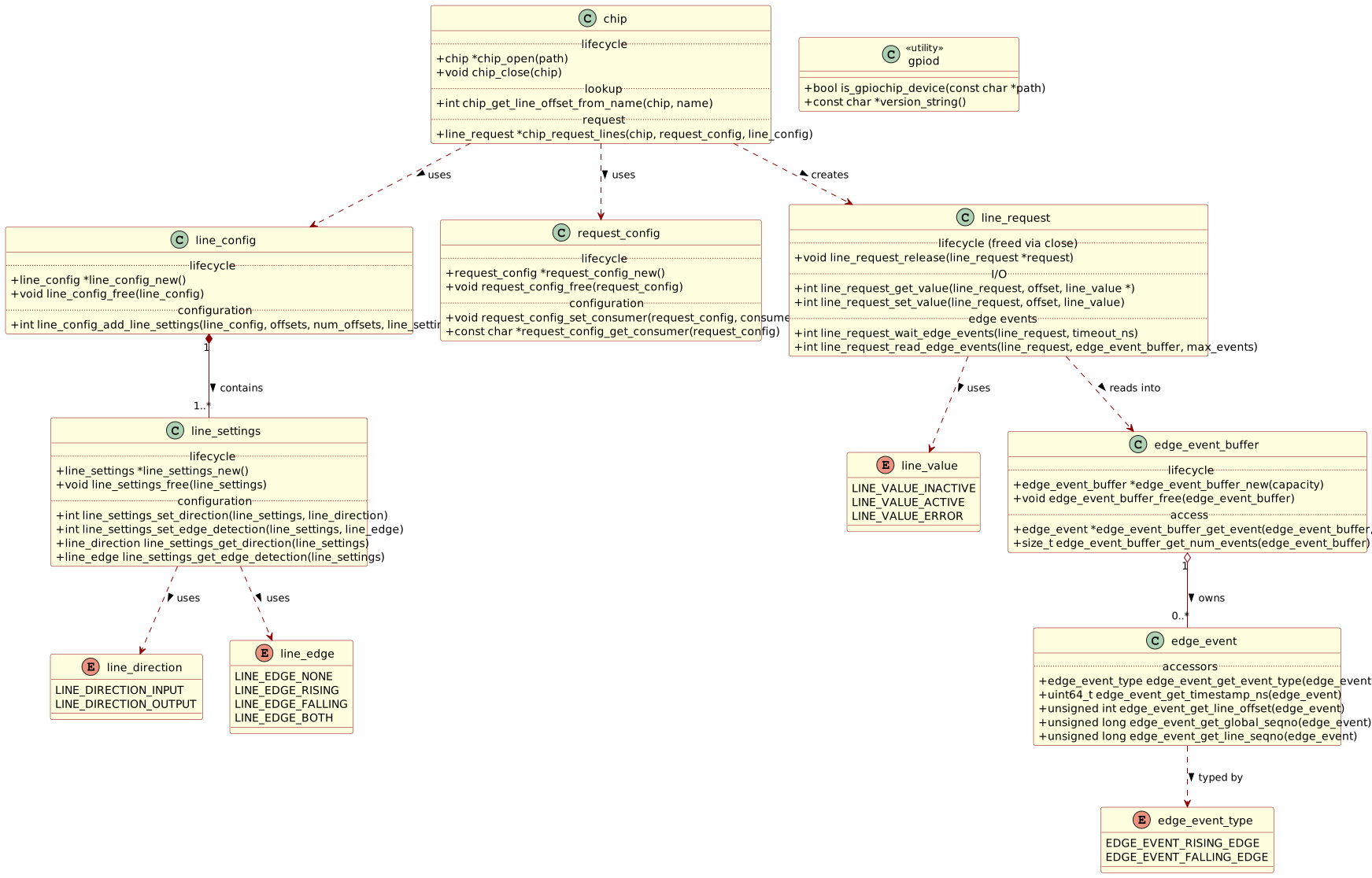
Figure 1: GPIO Library Abstractions
The diagram simplifies the names, specifically by omitting the gpiod_
prefix. It also elides the argument types for brevity. The library’s
documentation provides the full details. Nevertheless, it shows that
“line requests” sit at the centre of the abstraction hierarchy. A line
request is a collection of line settings, which in turn are collections
of line configurations. Edge-event buffers load edge events from the
kernel via line requests.
Notice that edge events carry a nanosecond timestamp. This is the time at which the kernel detected the edge. The kernel’s GPIO module uses the system clock to timestamp the event. There may be some latency between the actual edge and the timestamp, but it is likely negligible for ECHO pulse measurements, which are on the order of microseconds.
Scanning for Chips
GPIO “chips” represent the GPIO controller hardware. You open a chip
using its character device file, e.g. /dev/gpiochip0. But this implies
that you know the chip’s device path; otherwise, scan for chips.
Fortunately, the C standard library provides a function to scan
directories. The standard scandir() function reads the contents of a
directory and returns a list of directory entries. You can use this
function to scan the /dev directory for GPIO chip device files. It
takes a filter function to select only the entries that match the
desired pattern, such as gpiochip*. The following code snippet
demonstrates how to scan the /dev directory, or any specified
directory, for GPIO chip device files and return their paths.
ssize_t scan_dir_for_gpiochip_paths(const char *dir, char ***paths) {
  /*
   * Filter closure for scandir to find GPIO chip devices. This lambda-like
   * function will be called for each entry in the directory, and it will return
   * 1 if the entry is a GPIO chip device, and 0 otherwise. The function will
   * use gpiod_is_gpiochip_device to check if the entry is a GPIO chip device,
   * and it will also filter out symlinks to avoid false positives. Note that
   * this also means that GPIO chip devices that are symlinks will be ignored,
   * but this is a reasonable trade-off.
   *
   * This is a GNU-compiler extension that allows us to define a function inside
   * another function, and it can capture variables from the enclosing function.
   * In this case, it captures the dir variable from the enclosing
   * scan_dir_for_gpiochip_paths function, which is used to construct the full
   * path of the entry for the gpiod_is_gpiochip_device check. This allows the
   * scan operation to avoid having to pass the dir variable as an argument to
   * the filter function, and it keeps the code more concise and easier to read.
   * However, this is not standard C, and it may not be supported by all
   * compilers, so it should be used with caution if portability is a concern.
   */
  int gpiochip_device_filter(const struct dirent *entry) {
    char *path;
    if (dir_entry_path(dir, entry, &path) < 0) {
      return 0;
    }
    struct stat st;
    if (lstat(path, &st) < 0 || S_ISLNK(st.st_mode)) {
      free(path);
      return 0;
    }
    const int rc = gpiod_is_gpiochip_device(path);
    free(path);
    return rc;
  }
  struct dirent **entries;
  ssize_t num_entries = scandir(dir, &entries, gpiochip_device_filter, NULL);
  if (num_entries < 0) {
    return num_entries;
  }

  /*
   * Create an array of strings to store the paths of found GPIO chip devices.
   * The caller is responsible for freeing this array using free_gpiochip_paths.
   * The caller should use the returned number of found GPIO chip devices to
   * determine how many paths are in the array. If an error occurs while
   * creating the array of paths, the function will free any allocated memory
   * and return -1.
   */
  char **found = malloc((num_entries + 1) * sizeof(char *));
  if (!found) {
    free_dir_entries(entries, num_entries);
    return -1;
  }
  ssize_t num_found = 0;
  for (ssize_t i = 0; i < num_entries; i++) {
    char *path;
    if (dir_entry_path(dir, entries[i], &path) < 0) {
      free_gpiochip_paths(found, num_found);
      free_dir_entries(entries, num_entries);
      return -1;
    }
    found[num_found++] = path;
  }
  free_dir_entries(entries, num_entries);

  /*
   * Null-terminate the array of found paths. This is not strictly necessary,
   * but it can be useful for debugging and for certain use cases where the
   * caller may want to iterate over the array of paths without knowing the
   * number of paths in advance. The caller should still use the returned number
   * of found GPIO chip devices to determine how many paths are in the array,
   * and should not rely on the null-termination to determine the end of the
   * array. If the caller does not want the null-termination, it can simply
   * ignore the last element of the array.
   */
  found[num_found] = NULL;
  if (paths) {
    *paths = found;
  } else {
    free_gpiochip_paths(found, num_found);
  }
  return num_found;
}
You will notice some missing pieces in the code snippet above. The
dir_entry_path() function constructs the full path of a directory
entry by concatenating the directory path and the entry name. The
free_dir_entries() function frees the memory allocated for the
directory entries returned by scandir(). The free_gpiochip_paths()
function frees the memory allocated for the array of paths returned by
scan_dir_for_gpiochip_paths(). These functions are not shown here, but
they are straightforward to implement.
Filtering for GPIO chips
Of course, it requires a filter function to select only the entries that
match. For this, the GPIO library supplies
gpiod_is_gpiochip_device(path), which returns a non-zero value if the
path is a GPIO chip device. The filter function can use this to
determine whether to include the entry in the results.
The filter function answers non-zero to include the entry in the
results, and zero to exclude it. It uses dir_entry_path() to construct
the full path of the entry, and then calls gpiod_is_gpiochip_device()
to check if it is a GPIO chip device. It also filters out symlinks to
avoid false positives: devices that appear twice because of symbolic
links.
As you can read in the comments, the filter function is a GNU-compiler
extension that allows it to be defined inside another function, and it
can capture variables from the enclosing function. In this case, it
captures the dir variable from the enclosing
scan_dir_for_gpiochip_paths() function, which is used to construct the
full path of the entry for the gpiod_is_gpiochip_device() check. This
allows the scan operation to avoid having to pass the dir variable as
a static argument to the filter function, and it keeps the code more
concise and easier to read. However, this is not standard C, and it may
not be supported by all compilers, so it should normally be used with
caution if portability is a concern.
There is another side effect of the filter closure: it creates a binary
with an executable stack. The linker issues a warning about this, but it
is not a security concern in this case. Why is that? The GNU compiler
implements the filter function as a closure using a trampoline, which
means that it captures the dir variable from the enclosing function
and stores it in a hidden data structure on the stack. This allows the
filter function to access the dir variable without having to pass it
as an argument. However, this also means that the filter function needs
to be able to execute code on the stack, which is why the linker issues
a warning about an executable stack. In this case, it is not a security
concern because the filter function does not contain any malicious code,
and it is only used for filtering directory entries.
Edge Event Generator Pattern
The GPIO library provides a way to read edge events from GPIO lines, but it requires some setup and configuration. Reading edges, rising and falling, requires a pattern that is not immediately obvious.
A GPIO edge buffer has a limited capacity. Given a GPIO line request, a buffer read operation will return a number of events up to the buffer’s capacity. What happens if the request accumulates more events than the buffer can hold? After processing the first batch of events, the buffer needs refilling. The event processor repeats the refill until either (1) the process has seen all the available events, or (2) some error occurs.
A GPIO edge-event generator
It is useful to encapsulate the edge-event generator pattern in a C
structure. The structure holds the state of the generator, including the
request, the buffer, the maximum number of events to generate, the
number of events generated, and the current index in the buffer. The
structure can be used to create a generator object that reads edge
events from a GPIO line request in a loop, refilling the buffer as
needed until the desired number of events has been generated or an error
occurs. The following code snippet defines the
gpio_edge_event_generator structure.
struct gpio_edge_event_generator {
  struct gpiod_line_request *request;     /*!< The GPIO line request to read edge events from. */
  struct gpiod_edge_event_buffer *buffer; /*!< The buffer used to store edge events read from the request. */
  size_t max_events;                      /*!< The maximum number of edge events to generate. */
  int num_events;                         /*!< The number of edge events generated. */
  unsigned long index;                    /*!< The current index in the edge event buffer. */
};
The max_events field is used to limit the number of edge events
generated by the generator. By using
this value when initialising the
generator, the generator can be used to read all currently available
edge events from the line request without blocking or waiting for
additional events to become available. This allows for efficient
processing of edge events as they occur, while also providing a
mechanism to limit the number of events read in a single operation,
which can help manage resource usage and ensure that the program remains
responsive.
Initialising the generator involves setting the request, buffer and
max_events fields to the appropriate values, and setting the
num_events and index fields to zero. The generator can then be used
in a loop to read edge events from the line request, refilling the
buffer as needed until the desired number of events has been generated
or an error occurs. The following code snippet demonstrates how to
initialise the generator.
void gpio_edge_event_generator_init(struct gpio_edge_event_generator *generator /* generator to initialise */,
                                    struct gpiod_line_request *request /* request to read edge events from */,
                                    struct gpiod_edge_event_buffer *buffer /* buffer to store edge events */,
                                    size_t max_events /* maximum number of edge events to generate */) {
  generator->request = request;
  generator->buffer = buffer;
  generator->max_events = max_events;
  generator->num_events = 0;
  generator->index = 0;
}
Once set up, the generator can be used to read edge events from the line request in a loop, refilling the buffer as needed until the desired number of events has been generated or an error occurs. Its “next” function returns the next edge event from the buffer, refilling the buffer as needed. The function returns 1 if an event is returned, 0 if no more events are available, and -1 on error. The following code snippet demonstrates how to implement the “next” function.
int gpio_edge_event_generator_next(struct gpio_edge_event_generator *generator, struct gpiod_edge_event **event) {
  if (!generator || !event) {
    return -1;
  }
  if (generator->index >= generator->num_events) {
    if (generator->max_events == 0) {
      return 0;
    }
    const size_t capacity = gpiod_edge_event_buffer_get_capacity(generator->buffer);
    const size_t max_events = generator->max_events < capacity ? generator->max_events : capacity;
    if (max_events == 0) {
      return 0;
    }
    generator->num_events = gpiod_line_request_read_edge_events(generator->request, generator->buffer, max_events);
    if (generator->num_events <= 0) {
      return generator->num_events;
    }
    generator->index = 0;
    generator->max_events -= (size_t)generator->num_events;
  }
  *event = gpiod_edge_event_buffer_get_event(generator->buffer, generator->index);
  if (!*event) {
    return -1;
  }
  generator->index++;
  return 1;
}
The generator keeps refilling the buffer up to capacity until the
requested number of events has been generated. The max_events field is
decremented by the number of events read from the buffer, and the
num_events field is updated to reflect the number of events currently
in the buffer. The index field is reset to zero each time the buffer
is refilled, so that the next call to gpio_edge_event_generator_next()
will return the first event in the refilled buffer. The function returns
1 if an event is returned, 0 if no more events are available, and -1 on
error. This allows the caller to easily iterate over the edge events
output by the generator, while also providing a mechanism to limit the
number of events read in a single operation: limited by the buffer
capacity.
Usage Examples
You can find a working command-line HC-SR04 Ultrasonic sensor reader at GitHub. It incorporates the previously-discussed GPIO device scanning, edge-event generator and comes with optional Redis Stream output. The program accepts command-line arguments for the ECHO and TRIG GPIO pins, as well as optional Redis host, port, and stream max length parameters.
Printing Pulse Widths to Standard Output
Print pulse widths to standard output:
hc-sr04 --echo GPIO8 --trig GPIO11Sending Readings to Redis Stream
Send readings to Redis Stream hc-sr04 on localhost:
hc-sr04 --echo GPIO8 --trig GPIO11 --host 127.0.0.1With explicit Redis port and stream max length:
hc-sr04 --echo GPIO8 --trig GPIO11 --host 127.0.0.1 --port 6379 --maxlen 1000Read the stream in another terminal:
redis-cli XREAD BLOCK 0 STREAMS hc-sr04 $Each stream entry includes:
pulse_width_nsfield whose value encodes, in decimal, the ECHO pulse width in nanoseconds.
The program emits pulse width, not distance. This is by design. Translation of pulse width to distance depends on temperature and humidity, which are not known to the program.
Conclusions
Since distance depends on echo delay and temperature, the sensor output would benefit from a temperature sensor. That does imply that the output should be raw delta time \(t\), the duration of the ECHO pulse, since the sensor by itself has no access to temperature.
The HC-SR04 is easy to prototype from the command line and robust enough to run from userland via libgpiod, provided that edge timing is handled carefully and line ownership is managed correctly. In practice, the most reliable output from the sensor is raw ECHO pulse width, not a baked-in distance estimate.
That design choice keeps measurement and interpretation separate. The sensor can report accurate timing, while the application can convert timing to distance using the current speed of sound for the local temperature (and, if needed, humidity). For real deployments, pairing the HC-SR04 with ambient sensing yields more trustworthy distance estimates than assuming a fixed acoustic model. The HC-SR04 works well on Linux from userland, but production-grade results come from disciplined engineering around timing, ownership, and environmental context. The sensor should report pulse width; the application should own distance calculation.
Treat timing as truth and distance as a derived product. That separation keeps the data reusable, the model improvable, and the system trustworthy.
“This isn’t a car. This is the Batmobile.”—Batman (1989)
Personally, I prefer “freedom units” as the Americans say, i.e. inches, but the datasheet uses centimetres, so I follow suit.↩︎